


-

 Orders & Payments
-
Placing Orders
Placing OrdersHow do I check the balance on my Gift Card or eVoucher?
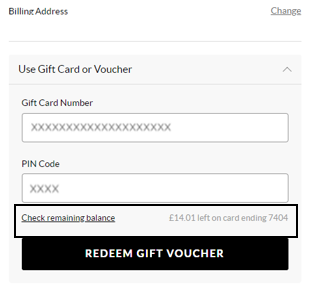
To view your balance on a Gift card or eVoucher you will need to add your items to the basket first and then once you've selected your delivery option you will be taken to the payment section. You will be presented with all the payment options available for your order. Select ‘Use Gift Card or eVoucher’ and enter your eVoucher/credit note code and pin number and then select ‘Check remaining balance’, you will then be able to see your balance.
Czy ten artykuł był dla Ciebie pomocny? Tak Nie
Wyślij opinięDziękujemy za opinię.
Jeśli chcesz bardziej szczegółowo opisać, w jaki sposób możemy ulepszyć tę treść, możesz podzielić się konkretnymi opiniami z autorem artykułu poniżej.
Uwaga: ta opinia NIE łączy Cię z zespołem obsługi klienta. Jeśli chcesz się z nami skontaktować, naciśnij przycisk Anuluj poniżej, a następnie naciśnij przycisk Skontaktuj się z nami i postępuj zgodnie z instrukcjami.
-
Placing Orders